
Cisco Physical Phones – Access and Update Voicemail
Access Voicemail and Update Voicemail Greeting (on your phone)
- On your physical phone, press the ‘Favorite’ key
 and the voice prompt will guide you through the steps.
 - One of the first steps will be updating your voicemail PIN from the default assigned PIN.
- The default PIN on the new system has been set to 080706.
- Upon choosing a new PIN, you will be prompted to record a greeting.
- Pressing the ‘Favorite’ key after these initial steps will allow you to listen to any voicemails that have been left for you.
- Alternatively, you may dial your office number or extension to reach the voicemail portal to which the same above process applies.

Access Voicemail and Update Voicemail Greeting (from your browser)
- Another way you can change the generic voicemail greeting is by logging into the Webex User Portal
(Sign in using your Roanoke College credentials) - Once signed in, you will see the ‘Webex User Hub‘ page.
- Access the ‘Voicemail‘ tab by choosing Settings → Calling → Voicemail:
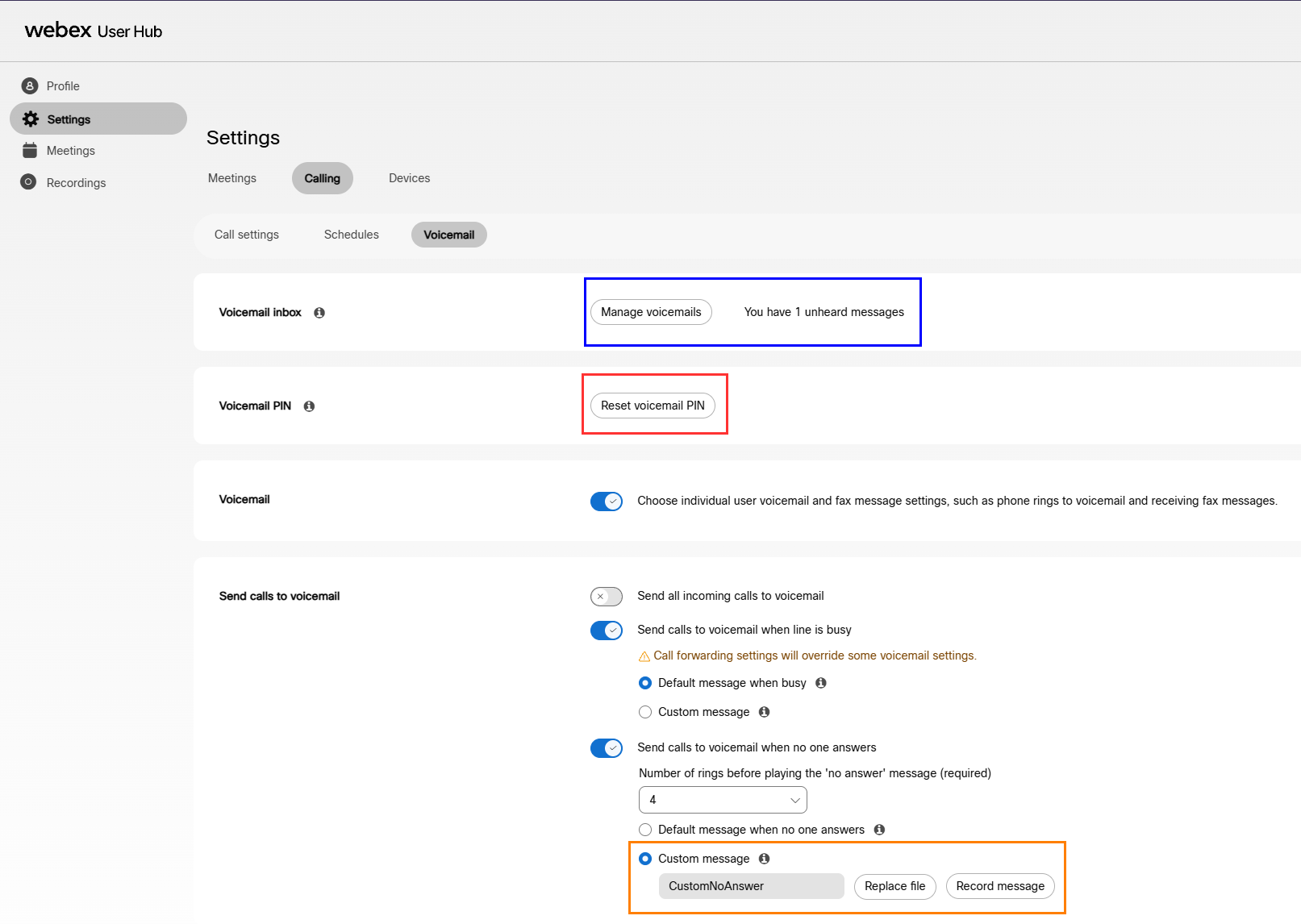
- In this section, you may access any voicemails you have by choosing ‘Manage Voicemails‘ (the blue box).
- Optionally, you may reset your voicemail PIN within this section by choosing ‘Reset Voicemail PIN‘ (the red box)
- Near the bottom of this page, you will see a section called ‘Send calls to voicemail‘
- In this section, you will see a button selected for ‘Default message when no one answers‘
- Select the button just below it named ‘Custom Message‘ (the orange box in the photo above)
- This will now allow you to either record a greeting or upload a greeting if you have one saved.
(It will be easier to record a new one, as there are particular file specifications required for uploaded audio) - After executing these steps, select save at the bottom right, and you are all done!
Note:
Ensure you have chosen the correct ‘Custom Message‘ field, as there is a second similar field.
This other ‘Custom Message‘ field is an option to have a greeting if you are receive a call while on a call