
Applies to | Guests | Wireless
Wireless Internet for Guests of Roanoke College
What is Roanoke College’s MaroonGuest WiFi Network?
Roanoke College has installed secure WiFi access points in all campus buildings. If your device is WiFi enabled, you can connect to the internet wirelessly while you are on campus.
How do I access MaroonGuest?
After a guest goes through a brief authentication process Roanoke College’s MaroonGuest WiFi network allows access to outside internet resources.
What equipment do I need to access the internet?
- A laptop computer with wireless capability
- A smart phone or tablet (iOS, Android, and Windows devices are supported)
Connecting to Wireless
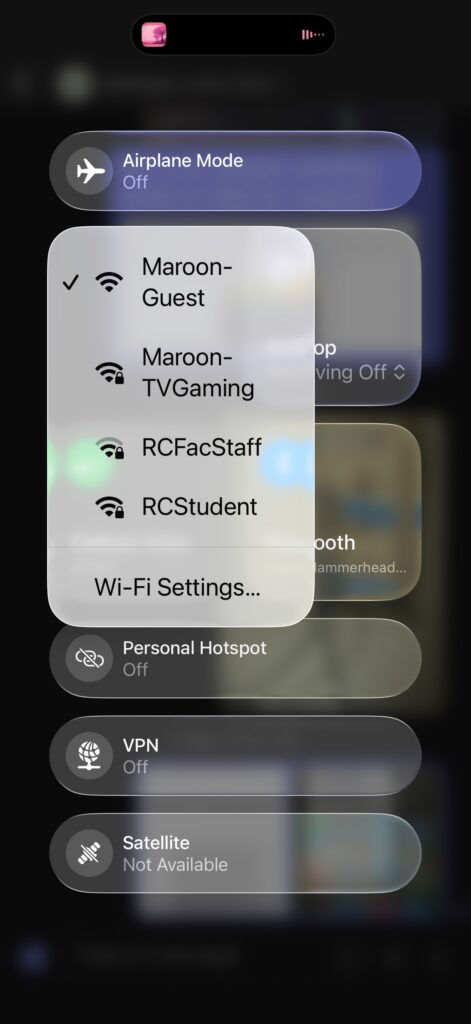
- Use your device’s standard procedure to select available wireless networks and connect to the one named “MaroonGuest”:
- Once connected launch your preferred browser & it should open to this agreement:
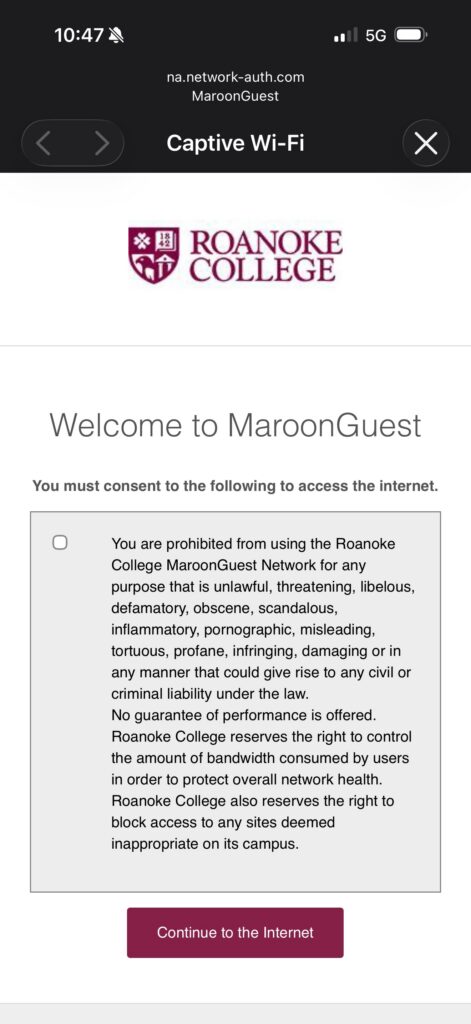
- Please read the terms and conditions and click the Maroon button to accept and begin using the internet!
Having Trouble?
The Helpdesk can provide basic help with these instructions. For more complex issues, consult your owner’s manual or contact your manufacturer’s support website or customer support number.